


Dr. Prius / Dr. Hybrid
3.0253.00 Reviews
App Specs
- Version
- 7.03
- Updated On
- License
- Free
- Downloads
- 100,000+
- Developer
- Pika Tech LLC
- Categories
- Auto & Vehicles
- Platform
- Android
Screenshots
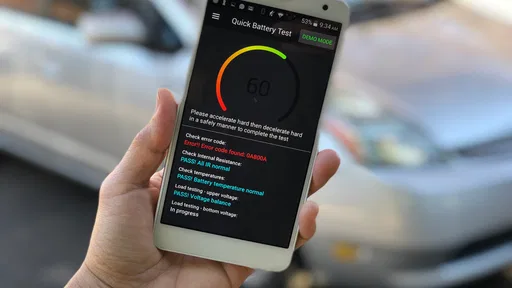
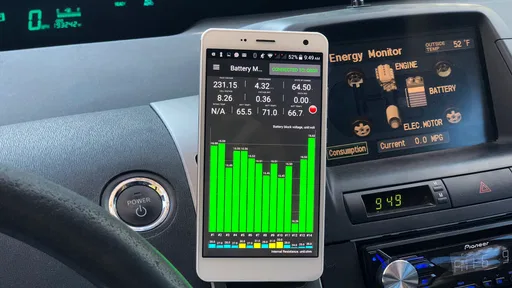
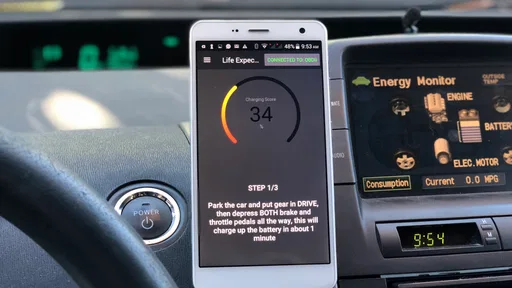
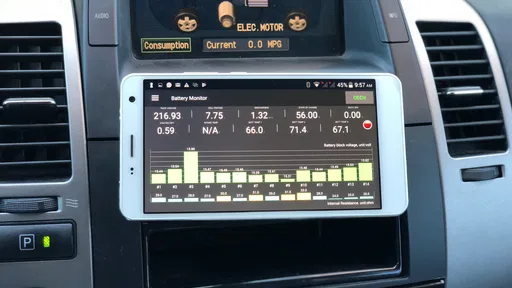
 Analysis by AppCompare
When a hybrid’s warning light appears, or an older car starts behaving differently, it is natural to wonder whether the high-voltage battery is involved. I see Dr. Prius / Dr. Hybrid as a focused first step for Toyota and Lexus hybrid owners who want to inspect battery health themselves, rather than a replacement for a mechanic’s diagnosis. The app’s promise is useful, but the experience depends on having a compatible car and a suitable OBD2 adapter. Knowing what to check before connecting can save frustration and help you treat the results as a starting point, not a final verdict.
Where setup tends to get stuck
The most likely point of friction is the connection between the car, adapter, and phone. The app cannot read vehicle information unless the adapter is properly connected to the vehicle’s OBD2 port and the phone can communicate with it. If nothing appears, I would check those basics before assuming there is a fault with the car or the app. An adapter that powers on is not necessarily communicating successfully, and a phone that is paired to something else may not be using the connection you expect.
Before buying an adapter, check that it is suitable for the intended vehicle and for the phone you plan to use. OBD2 adapters are not all interchangeable in practice, even when they look similar. Compatibility also matters at the vehicle end: the app is aimed at Toyota and Lexus hybrids, but that does not mean every model or year behaves identically. If you are checking a family member’s car or a used vehicle, confirm that the specific model is supported rather than relying on the brand name alone.
It also helps to separate two questions: can the app connect, and can it provide a meaningful battery assessment for this vehicle? A successful connection answers only the first. If your main goal is a hybrid-battery check, make sure that is the test you are trying to run, rather than treating any screen of vehicle information as proof that the battery has been assessed.
Using Dr. Prius / Dr. Hybrid with a clear plan
First things first, downloading and setting up Dr. Prius / Dr. Hybrid is a breeze. Available on both Android and iOS, you can find it on your respective app store. Once installed, you're greeted with a clean, intuitive interface that's easy to navigate. This app is all about functionality, letting you dive right into the features without any unnecessary fluff.
Connecting the app to your vehicle is straightforward. You'll need an OBD2 Bluetooth adapter, which pairs with your phone to relay information from your car's computer. Once connected, the app starts pulling data instantly. It's like giving your hybrid a virtual check-up, and you’re the doctor in charge!
In practice, I would set up while parked somewhere safe, with the car ready to communicate and the phone close enough to maintain a steady connection. Avoid trying to learn the menus while driving. If the adapter does not appear to connect, reseat it, check the phone’s Bluetooth connection, and restart the connection attempt. These are sensible first checks, not a guarantee that every adapter or vehicle issue can be fixed from the phone.
Worth Reading Before You Choose

EA SPORTS FC Mobile 26 Is a Bigger Football Game, but It Takes Time

Flipboard Shows What News Apps Must Do Beyond the Feed

Switching to Android Auto Means Rethinking Your Driving Routine

Google Calendar Makes a Crowded Week Easier to Manage

Ludo King Makes the Most of the Minutes Between Plans

Baby Panda World Brings Quick Play to Modern Phones, but Its Game Library Feels Busy
For a used-car inspection, the app can be one part of a broader check. I would run the battery test under consistent, calm conditions and keep a note of what the car was doing at the time. A result is more useful when you know which vehicle it came from and when it was taken. It should not be used to negotiate a purchase as though a phone test alone were a full inspection; a qualified hybrid technician can check the car more broadly and interpret problems in context.
Diving into the Features
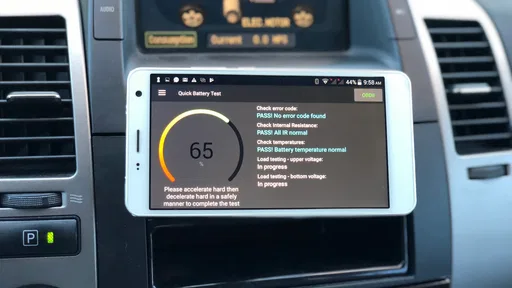
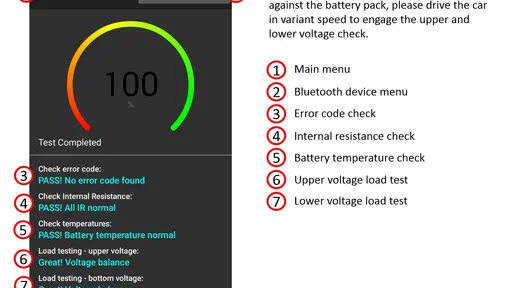
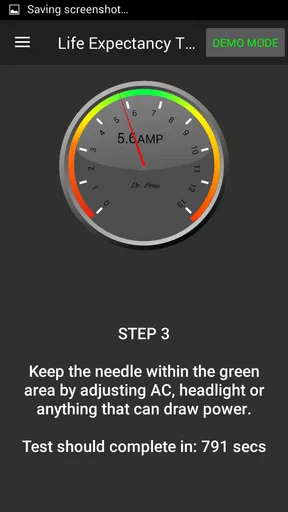
One of the standout features of Dr. Prius / Dr. Hybrid is its ability to perform a hybrid battery life expectancy test. This is crucial for anyone who wants to understand how much juice their battery has left. The app provides a detailed report, giving you peace of mind or a heads-up if it's time to start considering a replacement.
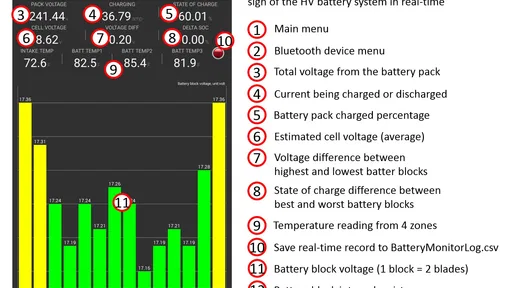
Another handy tool is the app’s ability to show real-time data. You can monitor everything from your engine temperature to fuel efficiency, all on a single screen. It’s like having a dashboard upgrade without the hefty price tag. Plus, the app allows you to log data over time, so you can track your vehicle’s performance and spot any trends or issues.
I would be careful not to read a battery-life estimate as a precise prediction of how long the pack will last. Battery condition is only one part of a hybrid’s overall health, and a single reading cannot explain every warning light, driving symptom, or repair decision. If the app raises concern, use that as a reason to ask better questions at a workshop, not as a reason to order parts immediately.
There is a useful trade-off in the live information: it can help a curious owner understand what the car is doing, but a stream of readings can also create noise. I would focus on the battery test or a specific question instead of watching every value without a reason. If you are comparing readings over time, repeat the check in broadly similar circumstances and record the date and conditions yourself. That makes changes easier to discuss, while avoiding the false confidence of comparing unlike situations.
When the connection or result seems wrong
If the app stops receiving information, I would work through the chain rather than changing several things at once. Confirm that the adapter is seated, check that the phone is connected to the intended adapter, and reopen the app before trying again. If the connection still fails, disconnect and reconnect the adapter and phone in a deliberate order. A repeatable setup makes it easier to tell whether the problem is the adapter, the phone connection, or the vehicle.
If the app connects but the battery test will not complete, do not assume the battery has failed. Check that the car is in a state where the test can run, follow the app’s on-screen instructions, and try again only when parked safely. If the same issue persists, testing with a different compatible adapter or asking a hybrid specialist to inspect the vehicle may be more productive than repeating the same attempt.
Sometimes the app is not the cause at all. A weak or inconsistent vehicle connection, an unsuitable adapter, a phone setting, or a fault elsewhere in the car can all affect what appears on screen. And if a warning light is accompanied by a serious change in how the vehicle drives, I would put safe driving and professional diagnosis ahead of app troubleshooting. The app can help organize a conversation with a mechanic, but it cannot repair the car or establish every cause by itself.
Why You Might Love It
If you're someone who likes to be in control and informed about your vehicle’s health, this app is a game changer. It empowers you with knowledge about your hybrid, which can help you make informed decisions about maintenance and repairs. Plus, there's a certain satisfaction in being able to diagnose issues yourself before heading to the mechanic.
The app also supports a variety of hybrid models, so there's a good chance your vehicle is covered. This broad compatibility makes it a versatile tool for hybrid enthusiasts. And if you ever feel stuck, the app comes with a comprehensive FAQ section and customer support, ensuring you’re never left in the dark.
Its clearest audience is an owner of a supported Toyota or Lexus hybrid who already has, or is willing to obtain, an appropriate adapter and wants a focused view of battery condition. It can also help a prospective used-car buyer arrive at a garage with a more specific concern. By contrast, if you want a general-purpose tool for many unrelated makes, a broader OBD2 scanner may suit you better. If you need a definitive repair diagnosis, a professional inspection is the better choice regardless of the app.
As an Auto & Vehicles app from Pika Tech LLC, it is free to install, with in-app purchases listed at $14.99 to $38.99 per item. It is rated for Everyone, has an average rating of 3.0 from around 1.3 thousand ratings, and has been installed over 100 thousand times. It was released on December 10, 2017; version 6.59 requires Android 5.0 or later. I would treat the rating as a reminder that experiences can vary, especially when setup depends on the adapter and vehicle, rather than as a substitute for checking whether it fits your own situation.
Final Thoughts
In the fast-evolving world of hybrid technology, having a tool like Dr. Prius / Dr. Hybrid is invaluable. It’s not just about diagnostics; it’s about empowerment and ensuring your vehicle is performing at its best. Whether you're on a quest to maximize efficiency or simply want to prolong the life of your hybrid, this app offers an accessible and user-friendly solution.
If you're ready to take control of your hybrid's health, give Dr. Prius / Dr. Hybrid a spin. It might just become your new favorite driving companion. So, go ahead, download it today, and see how it can transform your driving experience!
My practical recommendation is to install it when you have time to check compatibility and set up the adapter calmly, not in the middle of a stressful breakdown. If the connection works, use the battery test to gather context, save your own notes, and take concerning results to a qualified technician before making an expensive decision. If your car is outside the app’s intended Toyota and Lexus hybrid focus, or you need a full diagnosis across multiple systems, choose a tool or service designed for that job instead.
Pros
- Comprehensive battery health diagnostics.
- User-friendly interface for all users.
- Supports multiple hybrid vehicle models.
- Regular updates improve functionality.
- Real-time battery monitoring features.
Cons
- Limited to hybrid vehicle owners.
- Some advanced features require in-app purchases.
- Initial setup can be time-consuming.
- Requires Bluetooth OBD2 adapter.
- Interface may seem outdated to some users.
FAQs for Dr. Prius / Dr. Hybrid
What features does Dr. Prius / Dr. Hybrid offer?
Dr. Prius / Dr. Hybrid provides real-time diagnostics for hybrid vehicles, including battery health checks, life expectancy predictions, and error code readings. It supports multiple hybrid models and offers insights into battery performance through detailed graphs and statistics. The app also includes a drive test to assess battery condition under different driving scenarios.
Is Dr. Prius / Dr. Hybrid compatible with all hybrid vehicles?
While Dr. Prius / Dr. Hybrid supports a wide range of hybrid models, users should verify compatibility with their specific vehicle before downloading. The app primarily focuses on Toyota and Lexus hybrids, but updates often expand compatibility. Checking the app’s official website or store description can ensure your vehicle is supported.
Does Dr. Prius / Dr. Hybrid require additional hardware?
Yes, Dr. Prius / Dr. Hybrid requires an OBD2 Bluetooth adapter to connect to your vehicle’s diagnostic system. This adapter transmits data from the car to your smartphone, allowing the app to perform diagnostics. Make sure the adapter is compatible with your device and vehicle for optimal functionality.
Is Dr. Prius / Dr. Hybrid user-friendly for beginners?
Dr. Prius / Dr. Hybrid is designed with a user-friendly interface, making it accessible to users with varying levels of technical expertise. It includes detailed instructions and visual guides to assist in setup and operation. However, some familiarity with vehicle diagnostics may enhance the user experience.
Are there any costs associated with using Dr. Prius / Dr. Hybrid?
Dr. Prius / Dr. Hybrid offers a free version with basic features, but advanced diagnostics and additional features may require in-app purchases or a subscription. The cost of the OBD2 Bluetooth adapter is also an additional consideration. Users should review the pricing details in the app store to plan accordingly.


